
Domino's take, in one breath
What a radio studio is, the main types (on-air, control room, production or recording room, news booth, home, mobile), what each needs, and how to plan one.
On this page 5 sections
A radio studio is a quiet room where people talk into microphones for a radio show. It keeps noise from outside out and echo inside down, and the microphones go into a mixer or a computer that sends the sound to air.
Most stations have more than one. The on-air studio is where live shows happen: either the host runs everything alone, or a producer works the controls from a second room behind a window. Stations also use a production studio to record ads and shows that air later, a small booth for the news, and sometimes a bigger room for bands. Away from the station there are home studios, mobile studios for shows from events and, for an internet station, a laptop that sends the show to a server where the station's music keeps playing.
We run a streaming platform for radio stations and don't build studios: the rooms below are described from the stations' own pages and trade reports, and the acoustics from acoustic consultants, broadcasters' engineering guidelines and a maker of acoustic foam, each linked where we use it.
Types of radio studio
| Studio | What it's for | Who runs the desk | What goes in it |
|---|---|---|---|
| On-air studio, self-op | Live shows | The host | Mics on arms, a mixer in front of the host, headphones for each person (choosing them), the playout screen, an ON AIR light |
| Talk studio with a control room | Talk shows, interviews, shows with a producer | A producer or engineer, behind a window | Studio: mics, headphones, a cue light. Control room: the mixer, playout, phone system, speakers, talkback |
| Production studio | Ads, station IDs, recorded shows; a spare on-air room | Whoever is producing | A computer with editing software, an interface or mixer, a mic, speakers, sometimes a booth of its own |
| News booth | Bulletins read into other people's shows | The newsreader | One mic, a fader of its own or on the main desk, a screen for scripts, headphones |
| Performance studio | Bands and live sessions | An engineer in a control room | A larger room, with mic lines to a bigger mixer |
| Home studio | A presenter's own shows | The presenter | A mic, an interface or small mixer, headphones and a computer, in a quiet corner |
| Mobile studio | Shows from events and outside broadcasts | The presenter or an engineer | Anything from a phone app or a portable codec to an outside broadcast truck |
| Laptop with cloud playout | Live shows on an internet station | The host | A laptop, a USB mic or an interface, headphones and an encoder app |
On-air studio, self-op
In a self-op studio the host runs the desk: they talk, start the songs and the ads, ride the levels and put callers on air, with the mixer under their hands. In 2020, KPFA, the community-supported station in Berkeley, California, described the room used by KPFB, its small sister station, this way: the control room "shares the same space as the studio and has only 2 microphones and headphones," so a producer or engineer may not be able to sit in (KPFA).
A self-op studio is the cheapest to build and to staff, because one person does both jobs, and it is the studio a one-host music show needs. The room has to put everything the host touches within reach, seat a guest where the host can see them, and switch the speakers off and an ON AIR light on when a mic opens. Desk shapes and heights are in our desk design guide, the gear for each seat in our hardware guide, and a chair that stays quiet through a long show in our studio chair guide.
Talk studio with a control room
Here the people on air sit in one room and the desk is in another, behind a window. A producer or engineer runs the mixer, plays the music and the calls, and speaks to the presenter through talkback, an intercom into their headphones; Media Realm, an Australian broadcast technology company, lists a "Talkback/Intercom system" in its checklist for building a radio studio. The presenter can then think only about the conversation, which suits talk shows, news programmes, interviews (tips for running one) and shows with several guests and callers. In 2020, KPFA's Studio C, the studio of its main production room, had four microphones and "a dedicated control room allowing an engineer to stand by, connect to guests or remote studios, record, and ride controls as needed."
It costs a second room, a soundproof window between the two, and a second person on every show. If you're hiring for that seat, our guide to the radio producer's job covers what they do, and our studio pictures show how stations keep screens from hiding the window.
Production studio
The production studio is the station's recording room, for anything that doesn't go out live: ads, station IDs and promos, interviews edited for later and whole shows recorded ahead. At its centre is a computer with editing software, with an interface or mixer, a microphone, headphones and a pair of speakers, since a finished ad has to sound right on speakers as well as in headphones. A production room can have a studio of its own behind the glass, like KPFA's Studio C, above.
If it is built to the same standard as the on-air studio, it can stand in for it. WKCR, Columbia University's station in New York, described its Production Studio in the Blue Book, the technical manual for programmers it first wrote in 2003, as "the station's primary production facility", which can be used as an alternate on-air control room "in case of maintenance or emergency in Master Control" (WKCR).
News booth
A news booth is a small self-op room where a newsreader reads a bulletin into someone else's show, then goes back to the newsroom while the main studio carries on. It needs a mic, headphones, a screen for the scripts and a way onto the air: a small mixer of its own, or a fader on the main studio's desk. A small station rarely needs one, because the host reads the news from the on-air studio.
Performance studio
A performance studio is a bigger room for bands and live sessions, wired to a control room next door. KPFA's Studio D, its Performance Room, had no microphones of its own in 2020: four connection points ran to a 24-channel mixer in the main production control room, and it was used "most often for musical appearances on live shows." Plan it for space, mic lines for a full band, and isolation from the on-air rooms, because a band is the loudest thing in the building. KEXP's DJ booth in Seattle is soundproofed so a band can play in the public room outside it; it is among our pictures of real studios.
Home studio
Boom Radio, a UK station for baby boomers, went on air in February 2021 with every presenter broadcasting from home; IBC's website reported in March 2021 that it was thought to be "the first UK station without a central studio facility" (IBC). Boom's page on how it works says each presenter has their own kit: "just a normal PC or laptop, but connected to a pair of headphones and a top quality microphone." The room matters as much: "the location is usually a comfy corner rather than a hall with a high ceiling", to avoid "sounding like we are broadcasting from a church hall" (Boom Radio).
That is a home studio: a mic, headphones, an interface or small mixer and a computer, in the quietest and softest room in the house, run by the presenter.
Mobile radio studios and outside broadcasts
A mobile radio studio takes the show to an event. At the large end is an outside broadcast truck: Bayerischer Rundfunk, the public broadcaster for Bavaria, rebuilt its Ü5 radio truck around a 48-fader console with three operator positions, and it went into service in 2026 for concerts and opera and is built for sport as well (Sports Video Group).
At the small end, a presenter sends the show back over the internet, through a portable IP codec such as Comrex's ACCESS NX or an app on a phone. Remotes used to run over ISDN phone lines, which several countries were already withdrawing by 2014 (EBU Tech 3326).
An internet station needs less. The presenter's encoder sends the show straight to the station's server, with no codec at the other end, so a laptop or a phone on mobile data is a mobile studio. Our remote broadcasting guide covers the kit, bonded connections and keeping the link up.
Laptop with cloud playout
An internet station can do without a building. Its music, ads and IDs play from a server (the AutoDJ), so the studio is just the place where someone goes live: a laptop with a USB mic or an interface, headphones, and an encoder app such as BUTT that sends the show to the station. When the host disconnects, the server carries on. How that playout works is in our guide to AutoDJ hosting, and starting an internet radio station covers the rest of the setup.
Soundproofing and acoustic treatment are different jobs
Isolation, which most people call soundproofing, stops sound getting in or out: traffic, the next room, the heating, your voice reaching the neighbours. It takes mass and airtightness. Auralex, which makes acoustic foam, says good isolation "results from two main details: density and air gaps": heavy materials such as plasterboard and plywood, and a gap that separates a new layer from the existing wall (Auralex). At the top end, the radio studios in the extension to the BBC's Broadcasting House in London, finished in 2010 between two Underground lines, are what the acoustic consultants on the project, Applied Acoustic Design, describe as "radio boxes", built on floating floors "to maintain sound insulation" (AAD). In a smaller room, doors usually leak more than the walls around them, and studio windows are usually two sealed panes; our studio pictures guide covers doors and windows.
Treatment controls how the room sounds inside: how much of your voice bounces off the walls and comes back into the microphone. Foam panels, curtains, carpet, a sofa and full bookshelves do this. Auralex says of its own product: foam "is ideal for improving the sound in the room but does little to stop sound from leaking into or out of a room. Absorption and isolation are two separate phenomena." Those BBC radio studios were built with tuned absorbers for a reverberation time (how long a sound takes to die away) of 0.18 to 0.28 seconds, AAD's figures show.
A control room is treated for a second reason: the producer judges the sound on loudspeakers, and the room colours what they hear. The EBU's guideline for broadcasters' sound control rooms (1998) asks for a reverberation time of 0.2 to 0.4 seconds; on headphones, it notes, "the room has practically no influence" (EBU Tech 3276). A host on headphones still hears the room through the microphone, so the studio is treated for what the mic picks up.
How to plan a radio studio
List a normal week of shows. For each, write down how many people talk at once, whether guests or callers join, who plays the music, and whether anyone presents from somewhere else. The rooms come out of that list.
Turn the list into rooms. You need one on-air studio, and a second only if one show has to set up while another is on air, a control room only when someone other than the host runs the desk, a production room if ads, IDs and recorded shows have to be made while the on-air studio is busy, and a news booth only if bulletins break into shows someone else presents. Desk shapes for each layout are in the desk design guide, and what the rooms and the rest of a station cost in our guide to what it costs to start an online station.
Weak: "We'll build a talk studio and a control room, because that's what a real station has."
Better: "Weekdays are one host playing music, and Thursday's talk show has three guests and takes calls. One self-op studio with a guest table and a phone line into the mixer covers the week, and the ads get made there between shows."
Changed: the rooms come from the schedule, and the budget goes on the one room every show uses.
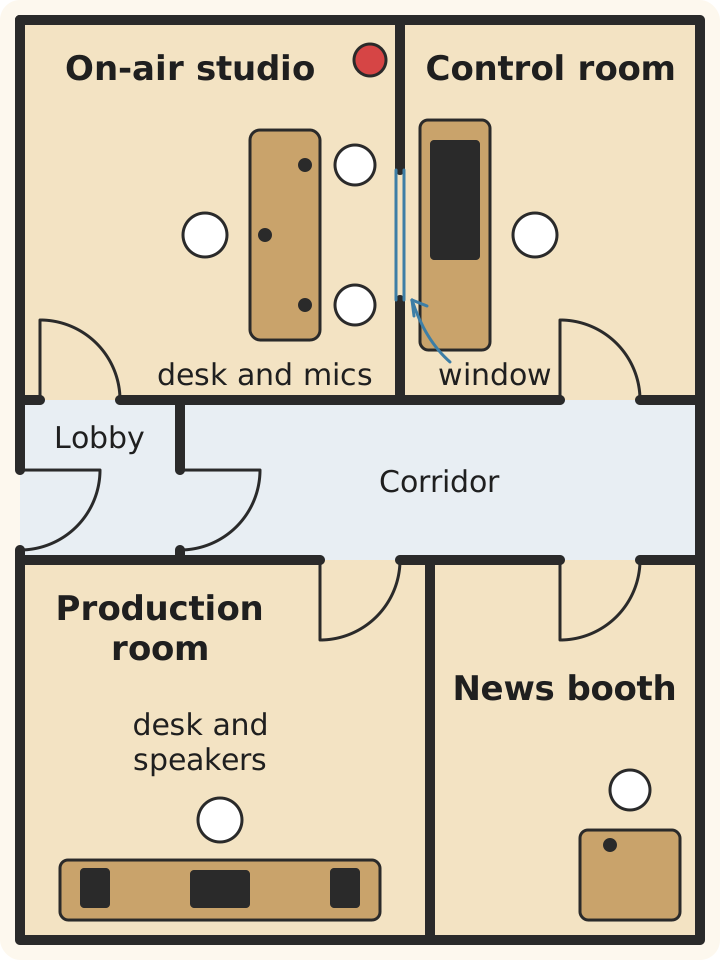
A small station suite, drawn by us: every room opens off a quiet corridor, and the street door has a lobby with a second door.
Choose the quietest room.
Away from the street, lifts, pipes and shared walls, and at the back of the building. Auralex's first answer to a noisy machine is to locate it "as far away as possible from people who may be bothered by it," and the same goes for a studio and its noise. Sit in the room with the door shut at the hour your show airs, and listen.
Seal it where noise gets in.
A solid door with seals all round, including the bottom; sealed gaps where cables and pipes pass; a window with heavy glass or a second pane.
Treat it for echo.
Clap once in the middle of the room: a ringing tail means hard parallel surfaces. Hang panels or a heavy curtain on the walls beside and behind the mic, put a rug down, and cover the desk in front of each mic with felt or cloth (what goes where on the desk).
Keep it quiet while you work.
Computer fans, air conditioning and heating all reach the microphone. At Broadcasting House, AAD had to fit enough silencing into the air conditioning to meet the radio studios' "stringent" noise limits. At home, put the computer away from the mics or in the next room, and plan how the room stays cool with the door shut.
Wire it to air.
The computer that runs your encoder sends the show to the station, so give it a network cable: our help advises against Wi-Fi for live shows. Our computer guide covers the machine.
Test it before the first show.
Record five minutes with every mic open and the door shut, then listen back on headphones and on speakers: traffic, hum, fan noise and room echo all show up. Then go live at a quiet hour (test before your first show); the Audience tab in CloudRadio statistics shows when people listen.
Where CloudRadio fits
When the studio is empty
Listening doesn't stop when the studio empties. In Radar, our collector, which follows public internet radio stations listed on Radio Browser, the hours from midnight to 6 a.m. held 13% of listening from 1 to 19 November 2026, in each station's local time. On CloudRadio, the AutoDJ plays your schedule, playlists and music library on our servers whenever nobody is live, with the studio computer switched off (how the automation works).
Going on air from any studio
Every CloudRadio One station has two live inputs: the Studio Input, for your own shows, and the Guest DJ Input, which takes priority over it. DJs you book on the schedule log in to the station's DJ input with their own login, which works only during their show (booked DJ shows, going live as a DJ). An on-air studio, a presenter's spare room and a phone at an event all go on air the same way, with an encoder app connected to one of those inputs (broadcasting live, from a phone).
The inputs take turns and are never mixed: a guest who connects to the Guest DJ Input takes the air from the host. A co-host in another place joins the host's own mix through a call app, the way a caller does, or a tool such as Cleanfeed (guests in another place).
A script can read your station's status feed and light an ON AIR lamp while a live input has the air.
Before you go live
Watch the meters on your mixer or encoder. The Live DJ page shows whether your encoder is connected but has no level meter for it, and unless the station has Cloud DSP (beta) switched on, CloudRadio doesn't compress or level live audio, so listeners get the levels you send (what we process, and what we don't, Cloud DSP). Booked DJs can connect up to 5 minutes before their show for a sound check held off air; the Studio and Guest DJ inputs go on air as soon as your stream arrives, so try a new studio at a quiet hour. Listen to yourself in headphones from the mixer, never on the stream, which reaches listeners about 20 seconds after you speak (how we measured it).
Recording the show
CloudRadio doesn't record live shows, so record in the studio. BUTT can record while it streams (recording software for radio shows), and some broadcast mixers record every channel to a memory card (choosing a broadcast mixer). A recording becomes a replay, a podcast or an aircheck to review your breaks.
Frequently asked questions
What is the difference between a studio and a control room?
The control room is the room with the mixer; the studio is the room with the microphones. WKCR's Blue Book defines a studio as "essentially an acoustically treated room with microphone jacks connected to a control room." In a self-op studio the two are one room, which a station may call either name: KPFA's 2020 page called KPFB's room a control room that shared its space with the studio.
Can I run a radio station from home?
Yes. Boom Radio runs a national station from its presenters' homes, and an internet station needs even less: a home studio for the live shows and an AutoDJ for the rest. Starting an internet radio station walks through it.
How do I choose a broadcast studio to hire?
Ask how your show gets to air from there: whether you can plug in your own laptop and encoder on a wired connection, or the studio sends the feed with its own codec. Sit in the room with the door shut at the hour you'll broadcast and listen for traffic, air conditioning and the room next door. Check that each person gets a mic, headphones and their own headphone volume, whether an engineer comes with the booking, and whether you leave with the recording, ideally one track per mic. Some stations rent out their production studios when their own programmers aren't using them: KPFA's rental page lists what it offered, with an engineer, though rentals were paused when we checked in October 2026 (KPFA studio rentals).
CloudRadio One connects whatever studio you have to your listeners: a Studio Input and a Guest DJ Input for live shows, DJ logins for presenters at home, AutoDJ when the studio is empty and stream monitoring, for $39/month with unlimited listeners.
Thanks for telling us.
Sorry about that. Tell us what was missing and we'll fix the post.
CloudRadio One
Ready to put this on air?
- AutoDJ keeps your station playing around the clock
- Go live from the software you already use
- A player for your website
- Unlimited listeners
$39/mo
Start your stationOne plan, everything included. No contracts, cancel anytime.